The Omogotchi Project
Introduction
This Project is a tribute to the 2020 role-playing video game “Omori”, that’s replicating the virtual handheld digital pet toys, Tamagotchi, created by Bandai. Like any virtual pet by Bandai, this “Omogotchi” include three characters from the Omori game: Omori, Aubrey and Basil, which a player could select from the character selection panel. Once a pet is selected, it could perform three distinctive tasks. such as eat, sleep, and play instruments. Taking care of the pets to get to happier emotional stages; but neglection overtime will cause the pet to return to its original emotional stage. All the animation used in the project is taken from the animation in the game, with alterations to make it fill the 128×128 oled screen.
Walkthrough
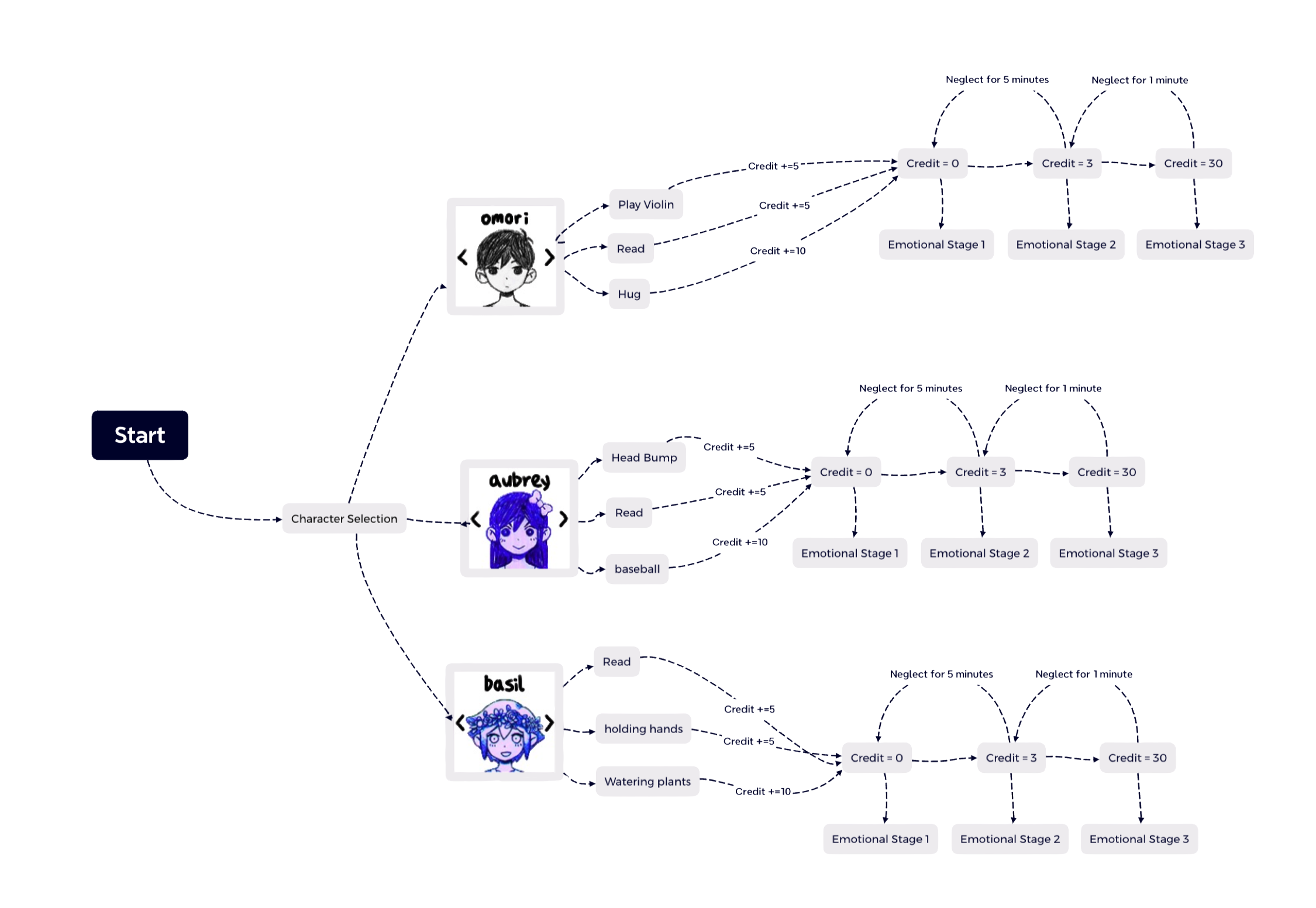
The game Started with the Title Screen, where the player would need to press the middle button to enter the game. Then, the Game would come to the Player selection Page, where the player could chose three of the characters to play with; the left and right button allows you to scroll left and right, and the middle button allows you to select. Then, after you chose a character, you will be shown the initial emotion stage of the character, with three task selection to do, each could be operated by one of the three buttons. Each task assign a different amount of “credits” to the character, and once there were enough “credits ”, the character would switch to an alternative stage; if the player don’t do something for a long time, it will reset the credit, and return to the previous emotional stage.
Technical Explainations
Setting Up
For this Game I used an Adafruit SH110X, which is an 128×128 px screen. To set it up, we should import the Example provided by Adafruit, and install the necessary attachments. I also included the better button class in order to save some lines of code. After that, I set up the button and the display to their pin positions.
Stages
This game is entirely Based on Stages. Despite the switchChannelButton, each time when the button is pressed, it’s doing nothing other than forwarding to a different game stage. Each game stage runs one or several function that either display a animation of bitmaps, or prepare for the next set of button press, or setting up time and credits, etc.
Bitmaps
There are a lot of bitmaps in this projects, each being a 3D array consisting of different frames of a 128×128 animation. The animations are from the game, but with alternations draw for the context of the Omogotchi and to fit the 128×128 screen. Due to space limit, the bitmap could be accessed in the GitHub repository by the end of this report.
Character Selection
The code character selection function is taken and altered from a previous lab, the drum sequencer channel selection. This function allow you to use the right button to switch the channel forward and left button to switch backward. And for each channel, a different character animation is played.
The Credit System
Based on the credit, the character will play a different set of animations corresponding with a different emotional stage. The variable “omoCredit” start with 0, and each time a task is performed, it will add the credit by 5 or 10. The variable “pressTime” will be set to equal to millis() everytime the player pressed the omogotchi, when millis()-presstime is biggere then a certain number, meaning the user haven’t operate for that amount of time, omoCredit will be reset.